
Have you ever noticed your phone slowing down or running out of battery faster than usual? If so, you’re not alone.
Your device needs regular attention to keep it running smoothly, and that’s where the Device Care app comes in. This handy tool helps you take control of your phone’s health, boost its performance, and extend its battery life—all with just a few taps.
Curious how it works and why you should use it? Keep reading to discover everything you need to know about the Device Care app and how it can make your daily phone experience better.

Credit: www.samsung.com
Device Care App Basics
The Device Care App helps keep your smartphone running smoothly. It manages storage, battery, and security in one place. This app is useful for anyone who wants to improve their phone’s performance without extra tools.
Understanding the basics of the Device Care App makes it easier to use. The app offers simple controls to optimize your device quickly. It works quietly in the background to keep your phone healthy.
Core Features
- Storage management to clear junk files and free space
- Battery optimization to extend battery life and monitor usage
- Memory boosting by closing unused apps running in the background
- Security checks to protect against malware and threats
- Performance monitoring with real-time updates and alerts
Supported Devices
The Device Care App is built into many Android smartphones. Most Samsung Galaxy devices have it pre-installed. Some other Android brands may support it through the Google Play Store.
Older devices might not support all features fully. The app works best on phones with recent Android versions. It requires moderate system resources to operate smoothly.
Installation Process
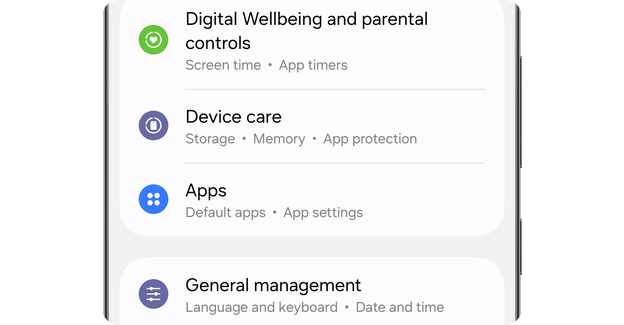
Check if your phone already has the Device Care App. Look in the settings menu under “Device care” or “Device maintenance.”
If not installed, visit the Google Play Store. Search for “Device Care” or “Samsung Device Care.” Tap the install button and wait for the app to download.
Once installed, open the app and grant necessary permissions. These allow the app to scan storage, battery, and security settings. After setup, the app is ready to help maintain your device.

Credit: www.samsung.com
Performance Optimization
Performance optimization is a key feature of the Device Care app that helps keep your device running smoothly. It tackles common issues that slow down your phone by managing battery use, clearing storage, and boosting memory. These tools work together to give you a faster, more responsive experience without complicated settings or extra apps.
Battery Management
Battery life can make or break your day, especially when you rely on your device constantly. The Device Care app monitors apps and processes that drain power in the background. It then suggests or automatically applies power-saving modes to extend your battery life without cutting essential functions.
Have you ever noticed your phone heating up or draining quickly? This feature targets those problems by limiting unnecessary activities, helping your battery last longer and stay cooler. You can also view detailed battery usage stats to understand which apps consume the most power.
Storage Cleanup
Running out of storage is frustrating and slows down your device. Device Care scans your phone for junk files, residual files, and unused apps that take up valuable space. It lets you remove these clutter items quickly, freeing up storage for photos, apps, and updates.
One time, I cleaned up over 2GB of hidden cache and temporary files with just a few taps, which immediately improved my phone’s responsiveness. The app also highlights large files or rarely used apps you might want to delete. Wouldn’t it be great to have more space without manually searching through folders?
Memory Boost
When your device lags or apps freeze, it’s often due to low available memory (RAM). The Device Care app helps by closing background apps that consume memory but aren’t actively used. This frees up RAM and speeds up your device without interrupting your workflow.
Imagine switching between apps without any delay or stutter; that’s the kind of smooth experience memory boosting aims to deliver. Plus, the app shows you how much memory is being used and lets you boost it with a simple tap. How much faster would your phone feel if you had more free memory right now?
Security And Privacy
Device Care App helps keep your phone safe and private by managing security settings. It cleans junk files and monitors device health for smooth performance. This app protects your personal data from threats and unwanted access.
Device Care App offers robust security and privacy features. It ensures your smartphone stays protected from threats. Users feel safer knowing their data is secure. This app helps maintain device integrity. It combines advanced security with easy-to-use tools. Each feature is designed to safeguard your digital life.Virus Scanning
The Device Care App includes virus scanning. It detects and removes harmful software. This helps prevent data theft. Regular scans keep your phone free from viruses. Users can schedule automatic scans. This feature provides peace of mind.App Permissions
Manage app permissions easily with Device Care App. It shows which apps access your data. Users can revoke permissions as needed. This stops apps from collecting unnecessary information. Reviewing app permissions strengthens privacy. It empowers users to control data access.Data Protection
Device Care App emphasizes data protection. It secures personal information on your phone. Encryption tools protect sensitive data. Users feel confident knowing their information is safe. This feature reduces risks of data breaches. Overall, it enhances device privacy.User Interface And Navigation
The Device Care app offers a simple and clear user interface. It helps users easily find and use all its features. The navigation is smooth, guiding users through different sections without confusion. The design focuses on clarity and ease, making it suitable for everyone.
Dashboard Overview
The dashboard is the main screen of the app. It shows all important information at a glance. Users can see phone status, battery health, storage space, and memory usage. The layout uses clear icons and labels. This helps users understand their device’s condition quickly.
Customization Options
The app allows users to personalize settings. Users can choose what information appears on the dashboard. They can adjust cleaning schedules and battery optimization preferences. This flexibility makes the app more useful for different needs. The settings are easy to find and change.
Notifications And Alerts
Device Care sends alerts to keep users informed. Notifications warn about low storage, battery drain, or security risks. Alerts are simple and direct. They help users take quick action to fix issues. Users can control which notifications they want to receive.
Troubleshooting Tips
Device Care apps are designed to keep your smartphone running smoothly, but sometimes they might not work as expected. Knowing how to troubleshoot common problems can save you time and frustration. Here are some practical tips to help you get your Device Care app back on track quickly.
Common Issues
Sometimes the app might freeze, fail to scan your device, or stop optimizing performance. These issues often happen because of temporary glitches or conflicts with other apps.
- Restart your phone to clear temporary files and refresh the system.
- Close other apps running in the background to free up memory.
- Check if the app has the necessary permissions to access system features.
Have you ever noticed your phone slowing down after installing a new app? It could be a permission conflict affecting Device Care’s function.
App Updates
Running the latest version of your Device Care app is crucial for smooth performance. Updates often include bug fixes and new features that address previous problems.
- Open your app store and check for available updates regularly.
- Enable automatic updates to avoid missing important fixes.
- If an update causes issues, uninstall and reinstall the app to reset its settings.
Have you checked your app version lately? Sometimes a quick update can resolve persistent issues without any extra effort.
Support Resources
If problems persist, support resources can provide detailed help and solutions. Many developers offer FAQs, user guides, and direct customer support.
- Visit the official website or app store page for troubleshooting guides.
- Contact customer support through email or chat for personalized assistance.
- Join user forums or community groups to learn from others’ experiences.
Would you consider reaching out for support before giving up on the app? Often, a quick message can lead to a simple fix.
Comparison With Similar Apps
Comparing the Device Care app to other similar tools reveals clear distinctions that impact how effectively you can maintain your device. Each app offers unique features and usability aspects that can either simplify or complicate your device’s upkeep. Understanding these differences helps you choose the right app tailored to your needs.
Key Differences
The Device Care app typically integrates deeply with the operating system, allowing it to perform tasks like memory cleanup, battery optimization, and malware scanning seamlessly. Other apps might offer more specialized features such as advanced file management or detailed system analytics but may require more user input.
Unlike many third-party apps, Device Care often provides an all-in-one solution with automated suggestions. This contrasts with apps that focus solely on one aspect, like antivirus protection or battery health, which may leave gaps in overall device maintenance.
Advantages
- Ease of Use:Device Care’s interface is designed for quick access, making it beginner-friendly.
- Integration:It works smoothly with system updates, minimizing compatibility issues.
- Automation:Regular scans and cleanups can run without much user intervention, saving time.
- Performance Boost:Many users notice faster response times after running Device Care.
If you want a straightforward app that handles multiple tasks at once, Device Care fits well.
Limitations
While Device Care covers many bases, it may not offer the depth of features found in specialized apps. For instance, its malware protection isn’t as comprehensive as dedicated antivirus software.
Some users find that automated cleanups occasionally remove files they prefer to keep, which calls for manual oversight. Also, the app’s optimization suggestions might not always suit power users who want more control over their device’s settings.
Have you ever felt an app cleaned too aggressively or missed a critical issue? Choosing an app that balances automation with user control can make a big difference in your device’s care.
Maximizing Device Care Benefits
Maximizing the benefits of your Device Care app can significantly improve your device’s performance and lifespan. It’s not just about running the app occasionally; integrating its features into your daily routine helps keep your device running smoothly. Let’s look at practical ways to get the most from Device Care.
Routine Maintenance
Regularly using the Device Care app for maintenance tasks prevents performance issues before they start. You can clear cache, close background apps, and free up storage space with just a few taps. Doing this weekly keeps your device responsive and reduces lag during critical tasks.
Think about the last time your phone slowed down—did you run any maintenance tools? Skipping this step often leads to slower apps and shorter battery life. Setting a habit to check Device Care regularly can save you from these frustrations.
Scheduling Scans
Most Device Care apps allow you to schedule scans automatically. Setting up daily or weekly scans helps catch issues like malware, junk files, and battery-draining apps without you having to remember. This automated approach ensures your device stays optimized even when life gets busy.
Have you noticed apps or files you rarely use draining your battery or storage? Scheduled scans identify these silently running processes so you can decide what to remove. This way, your device stays clean and efficient without extra effort on your part.
Optimizing Settings
Device Care apps often recommend specific settings to improve performance and battery life. Adjusting brightness, disabling unused permissions, or turning off location services when not needed can make a big difference. You control how aggressive these optimizations are, tailoring them to your daily needs.
Try tweaking these settings and observe how your device responds. You might find that turning off background data for certain apps extends your battery by hours. What small change can you make today to enhance your device’s efficiency?

Credit: www.samsung.com
Frequently Asked Questions
What Is The Main Purpose Of Device Care App?
Device Care App optimizes your smartphone’s performance by managing battery, storage, memory, and security. It helps keep your device running smoothly and extends battery life through regular maintenance and cleanup.
How Does Device Care Improve Phone Battery Life?
Device Care monitors battery usage and closes power-draining apps in the background. It also provides tips to extend battery life and manages settings for efficient power consumption.
Can Device Care App Boost Phone Speed?
Yes, Device Care clears cache and closes unused apps to free up RAM. This process enhances phone speed, reduces lag, and improves overall responsiveness.
Is Device Care App Safe To Use?
Device Care is a built-in, secure app on many smartphones. It does not collect personal data and only optimizes device performance without harming your files.
Conclusion
Device Care App helps keep your device fast and secure. It cleans junk files and manages battery use well. You can check your device’s health anytime. The app makes sure your phone runs smoothly. It’s easy to use, even for beginners.
Regular use can extend your device’s life. Simple steps lead to better device performance. Try using Device Care App to maintain your phone today.