

Imagine turning your car into a cozy mini-theater where you can watch your favorite movies anytime, anywhere. Whether you’re stuck in traffic, waiting during a long trip, or just want to relax while parked, having the right device to watch movies in your car changes everything.
You deserve entertainment that fits your lifestyle and keeps boredom at bay. You’ll discover the best devices designed to bring the magic of movies right to your car seat. Ready to make every ride more enjoyable? Let’s dive in.

Credit: www.amazon.com
Best Devices For Car Movies
Finding the best device to watch movies in your car can turn long drives into memorable entertainment experiences. The right gadget not only makes viewing easy but also keeps everyone comfortable and engaged. Let’s look at some top options that fit different needs and budgets.
Portable Dvd Players
Portable DVD players remain a popular choice for in-car entertainment. They don’t rely on internet connections, so you can enjoy movies anywhere, anytime. Many models come with swivel screens and built-in speakers, making them perfect for backseat viewing.
If you have a collection of DVDs, this device lets you bring your favorites on the road without extra hassle. Plus, some players support USB and SD cards, expanding your movie library without carrying physical discs.
Tablets And Smartphones
Your tablet or smartphone can double as a powerful movie device in the car. Both offer high-resolution screens and access to countless streaming apps, providing a versatile viewing experience. You can easily prop them up with a simple stand or mount, keeping your hands free and viewers entertained.
Battery life might be a concern on longer trips, but portable chargers or car adapters solve that problem effectively. Have you ever noticed how kids stay calm longer when they have their own screen? That’s the magic of personal devices.
Built-in Car Entertainment Systems
Many modern vehicles come equipped with built-in entertainment systems, often featuring dropdown screens or headrest monitors. These systems integrate seamlessly with the car’s audio setup, offering crystal-clear sound and video quality. They usually support multiple input sources like HDMI, USB, and Bluetooth, allowing you to connect various devices.
Though pricier, built-in systems eliminate clutter and cables inside the car. Consider this if you frequently travel with family or friends and want a permanent, hassle-free setup.
Streaming Devices For Cars
Streaming devices designed specifically for cars are gaining popularity. These gadgets connect to your car’s Wi-Fi or a mobile hotspot to stream content directly from platforms like Netflix or YouTube. Devices like Amazon Fire TV Stick or Roku can be adapted for use in vehicles with the right power source and screen setup.
This option requires a stable internet connection, but it offers access to an endless library of movies and shows. Would you prefer a streaming device that updates your entertainment automatically, or something simple and offline?
Screen Size And Display Quality
Choosing the right device to watch movies in your car depends heavily on screen size and display quality. These factors directly affect your viewing experience, making long drives more enjoyable or, conversely, frustrating if not chosen wisely. Let’s break down what you need to consider to get a screen that fits your space and delivers clear, vibrant images.
Choosing The Right Screen Size
Screen size matters a lot in a car environment. Too small, and you’ll strain your eyes; too large, and it might not fit comfortably or could distract the driver. Most people find screens between 7 to 12 inches ideal for backseat viewing—big enough to enjoy details without overwhelming the space.
Think about where you plan to mount the device. Headrest screens are popular because they don’t take up extra space and offer a good viewing angle. If you’re thinking of a portable tablet, 10 inches often hits the sweet spot for portability and visual comfort.
Resolution And Brightness
Resolution determines how sharp the picture looks. Aim for at least 1080p (Full HD) to enjoy crisp images and avoid pixelation, especially on larger screens. Higher resolutions like 4K are great but might be overkill if the screen is small or your video sources don’t support it.
Brightness is crucial inside a car, where sunlight can wash out screens quickly. Look for devices with at least 300 nits of brightness. If you’ve ever tried watching a movie on a dim screen during daylight, you know how frustrating it can be—brightness makes all the difference.
Touchscreen Vs Non-touchscreen
Touchscreens offer easy navigation, letting you quickly select movies, adjust volume, or pause without fumbling for a remote. However, non-touchscreen devices often come with physical buttons or remotes, which some find more reliable, especially when the screen is mounted out of reach.
Consider who will use the device most. Kids might love the simplicity of touch controls, while adults may prefer the precision of a remote. You could even combine both options if the device supports it, giving everyone flexibility.
Power Options And Battery Life
Choosing the right device to watch movies in your car means thinking about power options and battery life. These factors decide how long you can enjoy your movie without interruptions. Devices with strong batteries and easy charging solutions keep the entertainment going on long trips.
Battery Capacity For Long Trips
Devices with larger battery capacity last longer during your journey. Look for screens with batteries rated above 5000mAh. This capacity often provides 5 to 8 hours of continuous viewing time. Portable DVD players and tablets usually offer this range. It helps avoid frequent charging stops.
Battery capacity directly affects how far you can go without power. Devices with low capacity may need recharging every 2 to 3 hours. That can be annoying on a long drive. A good battery capacity supports non-stop movie fun.
Car Chargers And Power Adapters
Car chargers keep your device powered while driving. Most devices work with 12V USB car adapters. Choose chargers that support fast charging for quick power top-up. Many come with dual USB ports to charge more than one device at once.
Power adapters plug into the car’s cigarette lighter socket. They provide a steady power source during your trip. Some devices include special car charger cables. These cables fit perfectly and prevent battery drain.
Energy-efficient Devices
Energy-efficient devices use less battery power. LED or OLED screens consume less energy than older LCDs. Devices with automatic brightness adjustment save battery by reducing screen brightness in low light.
Choosing a device with a power-saving mode helps extend battery life. These modes limit background processes and reduce power use. Energy-efficient devices let you watch longer without charging.
Audio Solutions For Cars
Choosing the right audio setup can dramatically improve your movie-watching experience in the car. Sound quality affects how you connect with the story and characters on screen. Let’s look at the main options for audio in your vehicle and how each might fit your needs.
Built-in Speakers Vs External Speakers
Your car already has built-in speakers, but are they enough for movie audio? Built-in speakers are convenient and don’t require extra setup. However, they often lack depth and clarity, especially for action-packed scenes or subtle dialogues.
External speakers can offer richer sound and better bass. Portable Bluetooth speakers or specialized car audio upgrades can fill your car with cinema-like sound. Keep in mind, external speakers may require extra power sources or mounting space, which might not suit every vehicle.
Bluetooth And Wireless Audio
Bluetooth technology lets you stream audio wirelessly from your phone or tablet directly to your car’s speakers or external audio devices. This eliminates messy cables and keeps your setup neat.
Many modern cars support Bluetooth connections, but the audio quality depends on the car’s system and Bluetooth version. If you notice lag or poor sound, consider upgrading your transmitter or receiver. Have you tested your car’s Bluetooth audio with a movie soundtrack before?
Using Headphones In The Car
Wearing headphones can be a game-changer if you want to avoid disturbing other passengers or need extra sound detail. Wireless headphones give you freedom of movement without tangled cords.
However, they can isolate you from important driving sounds, so use them cautiously. Some cars have headphone jacks or support wireless audio transmitters specifically for rear-seat passengers. Do you prefer sharing the audio or enjoying it privately?
Mounting And Installation
Choosing the right way to mount your movie-watching device in the car can make all the difference in comfort and safety. The mounting and installation process needs to be straightforward yet secure, so your device stays put during every twist and turn. Let’s look at popular mounting options and how you can install them effectively.
Headrest Mounts
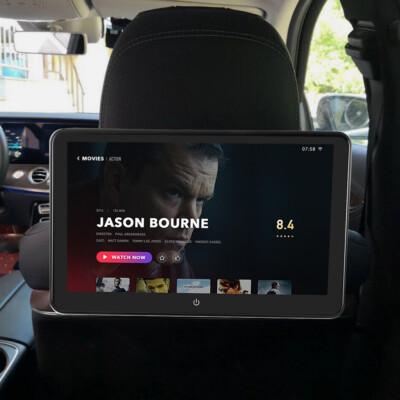
Headrest mounts attach directly to the back of the front seats, making them ideal for passengers in the rear. These mounts keep the screen at eye level, reducing neck strain during long trips.
Most headrest mounts come with adjustable straps or clamps that fit different headrest sizes. They are easy to install and remove, which is perfect if you want flexibility between vehicles.
Have you ever struggled to keep your device steady for backseat viewing? Headrest mounts solve this by locking the device in place, preventing it from wobbling or falling.
Dashboard And Windshield Mounts
Dashboard and windshield mounts are popular for front-seat passengers who want to watch movies during breaks or when the vehicle is parked. These mounts use suction cups or adhesive pads to secure the device.
Positioning is key here—you want the screen within easy view but not obstructing your driving line of sight. Many mounts offer adjustable arms to help you find the perfect angle.
Remember, these mounts are best used when the car is stationary to avoid distractions. Have you tried placing your device on the dashboard only to have it slide off? A quality mount prevents that problem effectively.
Installation Tips For Safety
Safety should always be your top priority when mounting devices in your car. Make sure mounts are firmly attached and don’t interfere with airbags or seatbelt operation.
- Test the stability of the mount before every trip to avoid sudden falls.
- Keep cables tidy and out of the way to prevent tripping or entanglement.
- Place devices where they won’t distract the driver or block essential controls.
Could your current setup be putting you or your passengers at risk? Taking a few extra minutes for secure installation can save you from unnecessary hazards on the road.
Credit: www.ebay.com
Content Sources And Playback Options
Finding the right device to watch movies in the car can make long trips enjoyable. With various content sources and playback options, choosing the best device might seem daunting. This section explores different methods to access and enjoy media in your vehicle.
Offline Media Playback
Offline media playback allows watching movies without an internet connection. Many devices support downloading films directly onto the device. Tablets and portable DVD players often come with built-in storage or allow for external storage use. This ensures uninterrupted entertainment, even in areas with poor signal. Check the device’s storage capacity before downloading movies to ensure enough space.
Streaming Services Compatibility
Streaming services offer a vast library of movies and shows. Most modern devices can connect to streaming platforms like Netflix, Hulu, and Disney+. Ensure the device supports app installation or web browsing. Look for devices with Wi-Fi or mobile data capabilities. These options provide endless entertainment choices during your travels.
Using Usb And Sd Cards
USB and SD cards are practical for storing media files. Many devices have ports for these storage options. Load movies onto USB drives or SD cards beforehand. This method offers flexibility and convenience, allowing easy swapping of media files. Ensure the device supports the video file format you plan to watch.
Connectivity Features
Connectivity features are essential for watching movies in your car. They allow smooth streaming and easy access to your favorite content. A good device supports various connection options to fit different needs and situations.
Wi-fi And Mobile Hotspots
Wi-Fi helps devices connect to the internet without cables. Many cars have built-in Wi-Fi or support mobile hotspots. Mobile hotspots use cellular data to provide internet on the go. This lets you stream movies from online services easily. A strong Wi-Fi or hotspot signal ensures a clear, buffer-free movie experience.
Hdmi And Av Inputs
HDMI and AV inputs let you connect external devices directly to the screen. This includes laptops, DVD players, and gaming consoles. HDMI offers high-definition video and audio in one cable. AV inputs use separate cables for video and sound. These ports make it simple to watch stored movies or play media from other devices.
Screen Mirroring And Casting
Screen mirroring copies your phone or tablet screen to the car’s display. Casting sends video from apps like YouTube or Netflix to the car screen wirelessly. Both methods work well for showing streaming content without extra cables. They provide a quick way to enjoy movies using your mobile device’s data or apps.
Budget And Value Considerations
Choosing a device to watch movies in your car requires careful budget and value considerations. Spending wisely ensures you get good quality without overspending. The goal is to find a balance between cost and the features you really need. This helps create a better viewing experience on the road.
Affordable Options
Many budget-friendly devices offer decent video quality and ease of use. Portable DVD players and basic tablet models fit well in this category. These options usually have smaller screens but work well for simple movie watching. They often come with built-in speakers or headphone jacks. This keeps costs low while providing essential functions.
Premium Features Worth Paying For
Some devices include extras that improve comfort and convenience. High-definition screens make movies clearer and more enjoyable. Devices with longer battery life allow for extended use without charging. Touchscreen controls and wireless connectivity add ease to operation. These features come at a higher price but add real value during travel.
Balancing Cost And Performance
Finding the right device means weighing price against what you get. Consider how often you will use it and the type of content you prefer. A mid-range tablet with good resolution and battery life can be a smart choice. Think about durability, screen size, and compatibility with your car setup. This balance ensures you enjoy movies without overspending.
Safety Tips While Watching Movies In Car
Watching movies in your car can turn travel time into fun time, but safety must always come first. It’s easy to get distracted or uncomfortable if you don’t set things up right. Let’s look at some practical tips that help you enjoy movies safely without risking your or others’ well-being.
Avoiding Driver Distraction
Never let the driver watch movies while driving. Even a quick glance away from the road can cause accidents. If you’re the driver, focus entirely on driving and let passengers handle the entertainment.
Make sure screens are positioned so they don’t catch the driver’s eye. Use screens that automatically dim or turn off when the car is in motion to reduce temptation. Have your passengers use headphones to keep noise from distracting the driver.
Passenger Viewing Comfort
Comfort matters more than you might think. Uncomfortable seating or poor screen placement can cause neck strain or headaches. Adjust seats and screens for easy viewing angles, and provide pillows or cushions if needed.
Choose devices with anti-glare screens for clear images even in bright daylight. Consider portable DVD players or tablets with adjustable stands for flexibility. Don’t forget to keep volume at a reasonable level to avoid disturbing the driver or other passengers.
Legal Considerations
Different places have laws about screens in cars, especially related to the driver’s view. Check local regulations before setting up your movie device. Some states ban video screens visible to the driver while the car is moving.
Ignoring these laws can lead to fines or worse, accidents. Keep the setup compliant by positioning screens only where passengers can see, never the driver. It’s worth asking yourself: is my setup legal and safe enough to avoid trouble on the road?

Credit: www.instagram.com
Frequently Asked Questions
What Devices Are Best For Watching Movies In A Car?
Portable DVD players, tablets, and headrest monitors are ideal. They offer good screen size and easy setup. Smartphones with streaming apps also work well for on-the-go entertainment. Choose based on screen quality, battery life, and connectivity options.
How Can I Connect A Device To My Car’s Screen?
Use HDMI, USB, or wireless connections like Bluetooth or Wi-Fi. Some cars support Apple CarPlay or Android Auto for seamless integration. Check your car’s manual for compatible methods to stream movies directly to the built-in display.
Are Wireless Devices Reliable For Movie Watching In Cars?
Yes, wireless devices are convenient but may suffer occasional buffering. Strong Wi-Fi or mobile hotspot improves streaming quality. Bluetooth connections work for audio but not always for video. Ensure your device supports stable wireless streaming for the best experience.
What Power Options Are Available For In-car Movie Devices?
Most devices use rechargeable batteries lasting several hours. Car chargers and power banks provide extended use. USB ports in cars can also power devices during trips. Always carry backup power to avoid interruptions during movie watching.
Conclusion
Watching movies in your car makes trips more fun and relaxing. A good device brings clear pictures and easy controls. Choose one that fits your needs and budget. Portable and easy-to-use devices work best on the go. Don’t forget to check battery life and screen size.
Enjoy your favorite films anytime, anywhere. Safe and happy travels!