
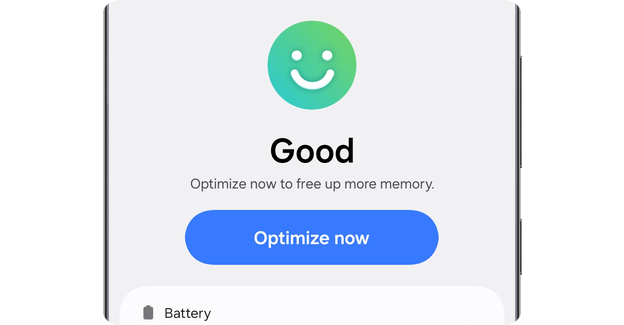
Is your Android phone slowing down or running out of space? You’re not alone.
Over time, apps, files, and background processes can clutter your device, making it lag and drain your battery faster. But what if there was an easy way to keep your phone running smoothly without any hassle? A Device Care app for Android can be your secret weapon to boost speed, save battery, and free up storage—all with just a few taps.
Keep reading to discover how this simple tool can transform your phone experience and make your device feel like new again.

Credit: www.reddit.com
Benefits Of Device Care App
The Device Care App offers several benefits that help keep Android devices running smoothly. It improves performance, extends battery life, and manages storage efficiently. Users can enjoy a faster, safer, and cleaner device experience with minimal effort.
Speed Enhancement
The app frees up memory by closing unused apps running in the background. It cleans temporary files and cache that slow down the device. This process helps apps open faster and reduces lag during use. Regular optimization keeps the phone responsive and smooth.
Battery Optimization
Device Care identifies apps that drain battery quickly and limits their activity. It adjusts settings to reduce power consumption without affecting important functions. Users can see how much battery each app uses. This helps extend battery life throughout the day.
Storage Management
The app scans for unnecessary files and deletes junk data safely. It organizes files to free up space on the device. Users get suggestions on what to remove to avoid storage overload. This prevents slowdowns caused by full storage and keeps the device tidy.
Security Features
Device Care scans for harmful software and alerts users to potential threats. It also checks app permissions to protect privacy. The app helps maintain device security by monitoring suspicious activities. This adds a layer of safety while using the phone daily.
Key Features To Look For
Choosing the right device care app for Android helps keep your phone fast and smooth. These apps offer several useful features that improve performance and extend battery life. Understanding key features guides you to pick the best tool for your needs.
Cache Cleaning
Cache files store temporary data to speed up apps. Over time, this data builds up and slows down the device. A good device care app clears cache regularly. This frees storage space and boosts phone speed.
Background App Control
Apps running in the background use memory and battery. Device care apps show which apps run secretly. You can stop unnecessary apps to save power and improve performance. This control helps extend battery life and reduce lag.
Battery Usage Monitoring
Battery monitoring tracks which apps use the most power. It shows real-time battery status and usage history. This feature helps identify battery-draining apps. You can adjust settings to save battery and keep your phone alive longer.
Junk File Removal
Junk files include leftover data from apps and downloads. These files take up space and slow the device. A device care app finds and deletes junk safely. Removing junk keeps your phone clean and fast.
How To Use Device Care App
Using the Device Care App on your Android can significantly enhance your phone’s performance and longevity. Whether your device feels sluggish or you’re worried about battery drain, this app offers practical solutions. Let’s dive into how you can make the most of this powerful tool.
Setting Up The App
First, ensure the Device Care App is installed on your Android device. You can find it pre-installed on many phones or download it from the Google Play Store. Launch the app and grant necessary permissions for optimal functionality.
Once opened, you’ll notice a user-friendly interface. Navigate through different tabs such as Battery, Storage, and Memory. Take a moment to familiarize yourself with each feature; this is your toolkit for a healthier device.
Running Speed Boost
Feeling like your phone is lagging? Speed Boost can be your savior. With a simple tap, the app clears background apps and unnecessary processes. This function helps free up RAM and enhances your phone’s responsiveness.
Try using Speed Boost before launching heavy apps or games. You’ll notice your device handling tasks more smoothly, without the annoying delays. What would you do with that extra bit of speed?
Optimizing Battery Life
If your battery drains too quickly, it’s time to optimize. Navigate to the Battery section and discover features like Power Saving Mode and Battery Usage Monitoring. These tools help you manage how your apps consume power.
Experiment with settings to find a balance between performance and battery life. You can extend your phone’s uptime without sacrificing essential features. Wouldn’t it be nice to go a whole day without reaching for your charger?
Scheduling Automatic Maintenance
Consistency is key to maintaining your device’s health. Device Care allows you to schedule automatic maintenance tasks. Set it up to run during times you don’t use your phone, like late at night.
This feature ensures your phone regularly undergoes routine checks without manual intervention. It’s like having a personal assistant for your device’s health. What could be more convenient than automatic care?
By leveraging these features, you can keep your Android in top shape without hassle. Try each option and see the difference in your device’s performance and reliability. What improvements will you notice first?

Credit: www.samsung.com
Tips For Maximizing Performance
Keeping your Android device running smoothly requires some simple habits. These tips help you get the best performance from your Device Care app. They improve speed, save battery life, and keep your phone healthy.
Small actions make a big difference in daily use. Follow these easy tips to keep your device fast and responsive.
Regular App Updates
App developers fix bugs and improve features in updates. Updating the Device Care app keeps it working well. Check for updates often in the Google Play Store. Updated apps use less battery and run faster.
Managing Permissions
Apps with too many permissions can slow your phone. Review Device Care’s permissions and remove any that seem unnecessary. Limited permissions help protect your privacy and save system resources.
Avoiding Overcharging
Charging your phone past 100% can harm the battery. Unplug your device once it reaches full charge. This prolongs battery life and maintains device performance over time.
Clearing Unnecessary Apps
Unused apps take up space and slow your device. Use Device Care to find and remove apps you no longer need. Clearing these frees up memory and speeds up your phone.
Popular Device Care Apps For Android
Keeping your Android device running smoothly is easier with the right device care app. These apps help clear junk files, boost performance, and manage battery life. Choosing one can feel overwhelming, so here are some popular options trusted by many users.
Samsung Device Care
Samsung Device Care is built right into Samsung phones, making it convenient and efficient. It offers features like battery optimization, storage cleanup, and memory management. Since it’s integrated, you don’t need to download anything extra, which saves space on your device.
If you use a Samsung phone, this app feels like a natural fit. It even provides security scans to keep your device safe. Have you noticed how your phone performs after using it? Many users report smoother operation with just a few taps.
Ccleaner
CCleaner is a popular app known for its powerful cleaning features. It quickly removes cache, junk files, and unused apps that slow your device down. The interface is simple, so you can clean up your phone without confusion.
Besides cleaning, CCleaner offers tools to monitor CPU usage and battery health. It’s like having a mini mechanic for your phone. Are you ready to free up space and improve speed with a single app?
Avg Cleaner
AVG Cleaner focuses on improving battery life and freeing storage by deleting unnecessary files. It also identifies apps draining your battery in the background and suggests which ones to remove. This can extend your phone’s daily use without charging.
The app’s automatic cleaning schedules keep your device optimized without constant attention. If you want a hands-off solution that still works hard, AVG Cleaner is worth trying. How much longer could your phone last each day with better battery management?
Files By Google
Files by Google is more than just a file manager; it also helps clean junk files and free up space. It suggests files to delete based on your usage, making it easier to decide what to remove. The app also supports offline file sharing, which is a handy bonus.
Because it comes from Google, it integrates well with Android and gets regular updates. Using Files by Google, you can keep your device tidy without getting overwhelmed by options. Wouldn’t it be nice to have a clean phone and more storage with minimal effort?

Credit: www.sammyfans.com
Frequently Asked Questions
What Is The Device Care App For Android?
The Device Care App optimizes your Android phone’s performance. It cleans junk files, manages battery usage, and boosts speed efficiently.
How Does Device Care Improve Android Battery Life?
Device Care monitors battery usage and closes apps draining power. It extends battery life by adjusting settings and optimizing background activity.
Can Device Care App Free Up Storage Space?
Yes, it deletes cache, residual files, and unnecessary data. This helps increase available storage and keeps the device running smoothly.
Is Device Care Safe To Use On Android Devices?
Absolutely. Device Care is a built-in Android feature from trusted manufacturers. It safely optimizes device performance without harming data or apps.
Conclusion
Device Care App for Android helps keep your phone running smoothly. It cleans junk files and frees up memory fast. The app also protects your device from threats and boosts battery life. Easy to use and understand, it suits everyone.
Regular use keeps your phone healthy and quick. Try it to enjoy a better phone experience every day.